
Choosing the right China Impresora Termica supplier requires more than comparing factory prices. A reliable partner should understand receipt printing, label applications, retail counters, warehouses, and mobile delivery work. The printer must match the operating environment, not merely look attractive in a product catalog.
Begin by checking real manufacturing experience. Review factory photos, production capacity, quality-control procedures, and export records. Ask for samples using your actual paper rolls, labels, barcode formats, and connection methods. A test receipt can reveal unclear text, weak cutters, unstable Bluetooth, or excessive heat. Small details matter.
Technical documentation should include print speed, resolution, paper width, interface options, power requirements, supported systems, and expected print-head life. Professional suppliers explain these limits clearly. Vague promises deserve caution. Compliance documents, warranty terms, spare-part availability, and response times also influence long-term costs. A low quotation may become expensive when replacement parts arrive slowly.
It is useful to compare at least three suppliers with the same requirements. Check whether the quoted model is genuinely available or only used to attract inquiries. Factory audits, video inspections, and independent customer references can strengthen confidence. However, references may not show every weakness. Even experienced buyers can miss packaging damage or firmware limitations.
The best choice balances quality, communication, service, and price. Consider the supplier’s ability to customize logos, packaging, manuals, and software support. Clear communication is essential. A careful supplier asks practical questions before offering a solution. That habit often indicates dependable engineering and responsible cooperation. Still, no supplier is perfect, so every decision should include testing, written agreements, and a realistic review of possible risks.
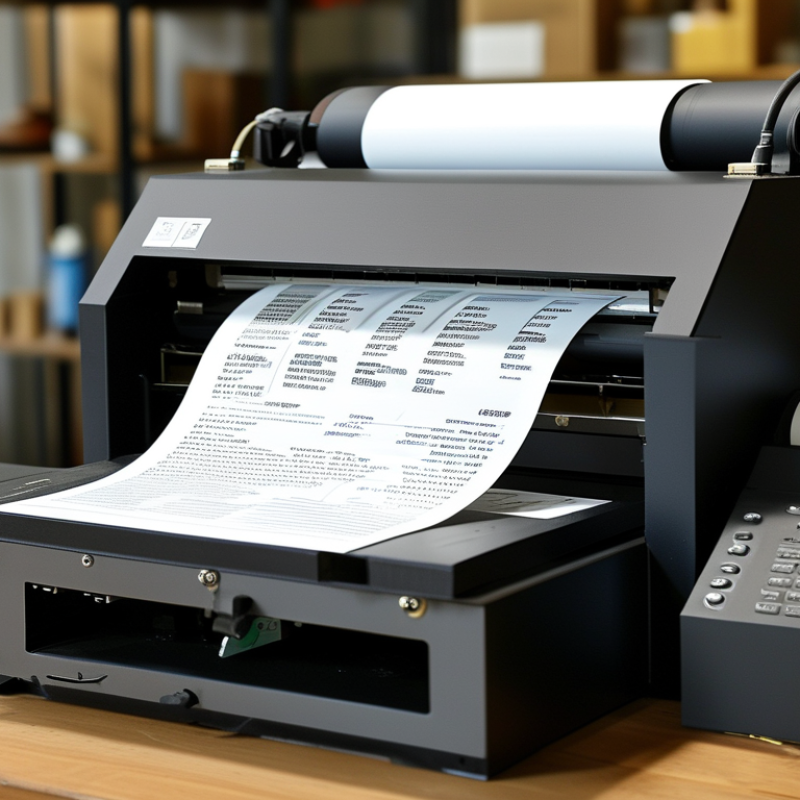
A thermal printer creates images by applying controlled heat to specially coated material. It needs no liquid ink. Direct thermal models print on heat-sensitive labels or paper, while thermal transfer models use a ribbon for longer-lasting results. The choice depends on storage conditions, label life, and print volume.
From practical equipment evaluations, a reliable supplier explains these differences clearly. They should provide accurate specifications for print speed, resolution, media width, interface options, and duty cycle. Ask for sample prints using your actual labels. Small details matter, such as barcode sharpness, sensor stability, and easy media loading. Test the printer when it is cold, busy, and nearly empty.
Supplier quality also reaches beyond the machine. Review factory experience, production controls, inspection records, and technical support. A dependable supplier can discuss spare parts, firmware updates, operator training, and response times without vague promises. Confirm material compatibility before placing a large order. Ask how defective units are handled, and request written quality standards. No supplier is perfect. I have seen attractive prices hide weak after-sales service. A cheaper printer may also create higher costs through jams and wasted labels. The best choice is usually the supplier that tests carefully, communicates plainly, and accepts reasonable technical questions. Reliability should be visible in both the product and the working relationship.
Defining thermal printing requirements should start with the workflow, not the printer catalogue. Record the label size, print volume, image density, connection type, and operating environment. A 100 × 150 mm shipping label needs different settings from a narrow shelf tag. Estimate your busiest hour, not the daily average. A printer rated for 200 labels daily may struggle during a three-hour dispatch peak.
Choose the printing method carefully. Direct thermal printing suits short-life receipts and temporary labels. Thermal transfer printing is more suitable for storage, friction, heat, or moisture exposure. The 203 dpi standard works for many barcodes, while 300 dpi offers sharper small text and detailed graphics. According to Grand View Research’s 2024 market assessment, the global thermal printing market was valued at about USD 4.3 billion in 2023 and is projected to grow at approximately 5.9% annually through 2030. This growth reflects wider demand, not automatic suitability for every operation.
Measure the media before selecting a China-based supplier. Check roll diameter, core size, adhesive behavior, ribbon width, and replacement availability. Ask for a real sample test using your own labels and software. Test faded prints, crooked feeding, network interruptions, and an eight-hour workload. Small mistakes become expensive quickly. A 2024 Smithers report on printed labels also highlights continued demand for efficient, digitally managed production. However, market forecasts can hide maintenance costs. A cheaper unit may require more cleaning, spare parts, or operator time. That part is often underestimated.
Before comparing suppliers, identify the resolution and printing speed required for your application. The chart below summarizes common thermal printing targets for different use cases.
Receipt and shipping-label printers commonly use 203 dpi, while product labels with smaller text or graphics often require 300 dpi. Fine-detail industrial or specialty labels may use 600 dpi. Actual print speed depends on media type, print width, darkness settings, and required image quality.
Reference basis: standard thermal printhead resolutions and commonly published operating ranges for direct thermal and thermal-transfer printing equipment.
China Best Impresora Termica Supplier How to Choose?
How to Evaluate Thermal Printer Quality and Technical Specifications
Choosing a reliable thermal printer supplier requires more than comparing prices. Print quality depends on resolution, printhead design, paper control, and temperature management. For receipts, labels, or tickets, match the printer’s resolution with the smallest text and barcode you need. A 203 dpi model may suit standard labels, while detailed graphics often require higher resolution.
Check the actual printing speed, not only the maximum figure in a product sheet. Ask for testing under your paper size, density, and connection method. Run continuous printing for several hours. Watch for fading, uneven lines, overheating, or paper jams. Small faults become expensive during daily production. Noise matters too, especially in retail counters or office environments.
Examine supported paper widths, roll diameters, interfaces, operating systems, and command languages. Confirm whether replacement printheads and cutters are available locally. Request sample prints, technical drawings, quality inspection records, and applicable compliance documents. A capable supplier should explain duty cycles, operating temperatures, and maintenance intervals clearly.
I once underestimated paper quality during a printer comparison. The device performed well in the showroom but produced weak barcodes with cheaper rolls. That mistake changed my evaluation process. Test the printer with your real media before placing a large order. Also review warranty terms, response times, firmware support, and spare-part availability. Specifications look precise, but practical evidence is stronger.
| Evaluation Dimension | Technical Specification or Quality Indicator | Recommended Benchmark | How to Verify a Supplier | Why It Matters |
|---|---|---|---|---|
| Printing Technology | Direct thermal or thermal transfer printing method | Choose direct thermal for short-term receipts and labels; choose thermal transfer when long-term durability is required. | Request a product datasheet and confirm the supported media, ribbon type, and intended application. | The printing method determines resistance to heat, light, abrasion, moisture, and chemicals. |
| Print Resolution | Printhead resolution measured in dots per inch (dpi) | 203 dpi for standard receipts and shipping labels; 300 dpi for smaller text, barcodes, or detailed graphics; 600 dpi for highly detailed labels. | Print samples containing small text, 1D barcodes, 2D codes, and graphic elements at the proposed resolution. | Higher resolution improves fine detail but may increase printer cost, processing requirements, and print time. |
| Print Speed | Maximum print speed, normally specified in millimetres per second | Approximately 100–200 mm/s for basic desktop use; approximately 200–300 mm/s for higher-volume commercial applications. | Compare the rated speed with actual test results using the required label size, print density, and interface. | Rated speed can vary significantly from real operating speed when complex graphics or high-density content is printed. |
| Print Quality | Consistency of text, barcodes, lines, and shaded areas across the print width | No missing dots, streaks, blurred edges, uneven darkness, or barcode scanning failures. | Conduct repeated print tests across the full print width and scan the printed barcodes with standard verification equipment. | Consistent output reduces rejected labels, unreadable codes, and customer complaints. |
| Media Compatibility | Supported paper, label, tag, liner, and media dimensions | Confirm maximum media width, minimum label length, roll diameter, core size, media thickness, and gap or black-mark sensing. | Test the exact media specification used in the target application rather than relying only on a general compatibility statement. | Incorrect media settings can cause jams, inaccurate positioning, sensor errors, and wasted labels. |
| Print Width | Maximum printable width based on the installed printhead | Common formats include approximately 58 mm, 80 mm, 4 inches, or 6 inches, depending on the application. | Check the printable width, not only the overall printer body width, in the technical drawing. | The available print width must match the receipt, label, tag, or shipping document format. |
| Connectivity | USB, Ethernet, serial, Wi-Fi, Bluetooth, or other supported interfaces | USB is suitable for local operation; Ethernet is useful for shared networks; Wi-Fi or Bluetooth is useful for mobile workflows. | Test the printer with the actual operating system, network environment, mobile device, and application software. | Stable connectivity supports reliable data transmission and reduces installation problems. |
| Command Languages | Printer command compatibility and software integration support | The printer should support the command language required by the buyer’s label-design or point-of-sale software. | Send native print commands and verify label positioning, barcode output, fonts, images, and calibration. | Command compatibility reduces the need for custom software development and simplifies replacement planning. |
| Operating System Support | Compatibility with Windows, Linux, Android, iOS, or embedded systems | Support should match the customer’s current operating system and planned deployment environment. | Request drivers, software development kits, integration guides, and installation instructions before purchase. | Driver quality directly affects deployment time, maintenance effort, and long-term usability. |
| Printhead Life | Expected service life under defined operating conditions | Evaluate life by printed length or operating conditions, not by a single universal number. | Ask for the test method, recommended print density, media type, cleaning schedule, and replacement procedure. | Printhead life is strongly affected by heat, pressure, dust, media roughness, and maintenance practices. |
| Duty Cycle | Recommended printing volume per day or month | Select a model whose recommended duty cycle is comfortably above the customer’s expected workload. | Compare the published duty cycle with actual peak-season volume and continuous-printing requirements. | Operating beyond the recommended workload may increase overheating, wear, jams, and service interruptions. |
| Temperature Control | Printhead temperature monitoring and overheating protection | The printer should regulate printhead temperature and stop or reduce operation when overheating is detected. | Review protection features and perform a continuous-printing test under the intended environmental conditions. | Temperature control protects print quality and extends the useful life of the printhead. |
| Paper and Media Sensors | Paper-out, cover-open, gap, black-mark, and label-position detection | Sensors should accurately detect the media type and stop printing when a fault occurs. | Test different roll diameters, label gaps, black marks, transparent liners, and end-of-roll conditions where applicable. | Reliable sensing prevents misaligned labels, blank prints, material waste, and unexpected downtime. |
| Mechanical Construction | Frame strength, cover design, platen roller quality, cutter or peeler durability, and service access | The structure should remain stable during continuous operation and allow routine parts replacement. | Inspect sample units, open and close the cover repeatedly, check roller alignment, and review maintenance instructions. | Good mechanical design improves reliability and reduces service time. |
| Environmental Conditions | Specified operating temperature, humidity, dust protection, and storage conditions | Select a model rated for the actual workplace, such as offices, warehouses, retail counters, or industrial areas. | Request the environmental specification and verify whether the rating applies to the complete printer or only selected components. | Temperature, humidity, dust, and vibration can affect print quality and electronics reliability. |
| Energy Consumption | Input voltage, power adapter rating, standby power, and operating power | The power supply should match the destination country and provide stable output under peak printing load. | Check electrical certifications, adapter specifications, plug type, and power consumption measurements. | Correct power design improves safety, operating stability, and installation compatibility. |
| Safety and Compliance | Applicable electrical, electromagnetic compatibility, and material safety requirements | Compliance documents should match the exact printer model and target market. | Request valid test reports or declarations and verify model numbers, issuing laboratories, and document dates. | Accurate compliance documentation reduces customs, installation, and regulatory risks. |
| Quality Control | Incoming inspection, assembly inspection, functional testing, and final inspection procedures | A supplier should use documented quality checkpoints with traceable test records. | Ask for inspection procedures, sample test reports, defect classification rules, and corrective-action records. | Documented quality control is more dependable than visual inspection alone. |
| Sample Testing | Performance of pre-production or production samples under real operating conditions | Approve a sample only after testing the required media, print speed, interfaces, software, and workload. | Use a written acceptance checklist and compare production samples with the approved reference sample. | Sample approval helps prevent differences between demonstration units and mass-produced units. |
| Spare Parts | Availability of printheads, platen rollers, cutters, sensors, cables, and power adapters | Frequently replaced parts should have clear part numbers, lead times, and replacement instructions. | Request a spare-parts list, service life information, prices, and recommended inventory levels. | Accessible spare parts reduce downtime and support long-term maintenance. |
| Warranty and Service | Warranty duration, coverage, response time, repair process, and technical support channels | The agreement should define warranty exclusions, replacement procedures, remote support, and escalation contacts. | Review the written warranty terms and ask how faults are diagnosed, repaired, replaced, and documented. | Clear service terms reduce uncertainty after installation and during high-volume operation. |
| Supplier Delivery Capability | Production capacity, lead time, packaging, shipment protection, and order consistency | The supplier should provide realistic lead times and maintain consistent specifications across repeat orders. | Review production schedules, packaging samples, inspection records, and delivery performance for comparable projects. | Reliable delivery is essential when printers are part of a larger retail, logistics, or manufacturing rollout. |
| Total Cost of Ownership | Purchase price plus media, printheads, maintenance, energy, downtime, software, and freight costs | Compare the estimated cost per printed label or receipt over the expected service period. | Build a five-year cost model using actual print volume, consumables, replacement parts, and service assumptions. | The lowest initial price does not always provide the lowest operating cost. |
When searching for the best China thermal printer supplier, verify capabilities beyond an attractive website. Request a live factory video or arrange an independent audit. Check whether the supplier controls printing, assembly, testing, and packaging. A trading company may still be suitable, but its production partner should be clearly disclosed.
Ask for recent sample units from the same production line. Test print density, paper feeding, cutting accuracy, connection stability, and performance after several hours. Review inspection records, component traceability, and failure rates. Certifications should match the exact model, not a similar product. Confirm production capacity with purchase orders, staffing details, and realistic lead times. Numbers without evidence are weak.
Communication also reveals technical maturity. A capable supplier can explain firmware updates, spare parts, warranty limits, and response procedures. Ask difficult questions. Notice whether answers remain consistent. I once focused too heavily on price and overlooked the cost of replacement parts. That mistake was avoidable. A polished showroom can mislead. Request a written quality agreement and a pre-shipment inspection. Even then, small defects may appear after delivery, so keep performance records and review the supplier regularly.
When comparing thermal printer suppliers, do not judge pricing from one quotation. Request identical specifications, including print speed, resolution, interface, paper width, and test quantity. A cheaper unit may exclude spare parts, software support, or protective packaging. Ask for a detailed pro forma invoice. Check payment stages and warranty terms carefully. I have learned that unclear wording often becomes an expensive problem later.
Support quality deserves equal attention. Ask how quickly engineers answer technical questions and whether remote troubleshooting is available. Request manuals, sample labels, and a replacement-parts list before placing a large order. Review certifications such as CE, RoHS, or other documents required in your destination market. Verify that certificates match the exact model, not merely a similar product. One weakness in my own checks is trusting scanned documents without confirming their scope.
Tips: Compare total landed cost, not factory price alone. Confirm whether shipping uses EXW, FOB, or another agreed term. Put production time, inspection rights, packaging details, and delivery penalties in writing. Ask for a small sample order first. Measure print clarity after repeated use. Keep records. This makes supplier claims easier to test and future support easier to evaluate.
: A thermal printer creates images with controlled heat. It uses coated paper or a transfer ribbon instead of liquid ink.
Direct thermal printing uses heat-sensitive paper. Thermal transfer printing uses a ribbon for longer-lasting labels.
A 203 dpi printer suits standard labels and receipts. Higher resolution helps with tiny text, detailed graphics, and dense barcodes.
Maximum speed figures may not reflect daily performance. Test your paper, label size, print density, and connection method.
Run continuous printing for several hours. Check for fading, uneven lines, overheating, noise, and paper jams.
Confirm paper width, roll diameter, interfaces, operating systems, command languages, duty cycle, and operating temperature.
Sample prints reveal barcode sharpness, text clarity, sensor stability, and media compatibility. Test your actual labels, not only showroom samples.
Review inspection records, spare parts, firmware updates, training, warranty terms, and response times. Written details matter.
Yes. Frequent jams, wasted labels, weak barcodes, and unavailable parts can increase operating costs.
A dependable supplier tests carefully and explains specifications plainly. No supplier is perfect. Stay cautious.
Choosing the right Impresora Termica supplier in China requires more than comparing product prices. First, understand your printing needs, including print volume, label or receipt size, connectivity, speed, resolution, operating environment, and compatibility with your existing systems. These requirements will help you select the appropriate printer type and avoid paying for unnecessary features.
Next, evaluate technical quality through print consistency, durability, component reliability, energy efficiency, and ease of maintenance. A dependable supplier should demonstrate manufacturing capabilities, quality-control procedures, product testing, customization services, and stable production capacity. When comparing suppliers, consider the total value rather than the lowest quotation alone. Review warranty coverage, technical support, communication efficiency, certifications, payment conditions, production lead times, packaging, and delivery terms. Clear documentation, transparent pricing, and responsive after-sales service are strong indicators of a professional partner capable of supporting long-term business needs.
